| 1-Wire Ground |
BLACK |
YES |
| 1-Wire Bus |
YELLOW |
YES |
| Aux. Power |
RED |
Optional |
|
Now that I've got that out of my system, there are a lot of different ways to
use this board. Let's cover the basics first.
For starters, this board only needs two of the three classic 1-Wire signals: the
Black (Gnd) and Yellow (Bus) wires. The Red (Pwr) may be connected, but
it's not used in any way, except to pass through to the other 1-Wire connector. |
|
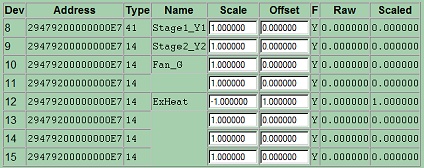
When the WEL discovers the WEL-HVAC-8S, it adds it to the device list
as a block of 8 devices. The first device will be type 41 and
the rest will be type 14. The 8 devices correspond to input
channels 1 to 8. Inputs 1,2,3 & 5 are used in
this example. Input 5 is inverted. |
 |
|
With the default scale and bias values, if there is a
voltage present on a pair of inputs wires, the WEL will report a scaled
value of 1.0. This can be changed to any other value simply by
changing the scale or offset for that device. Here are some
examples:
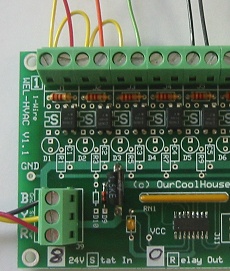 |
Direct HVAC monitoring.
If you have access to the thermostat call inputs on the
HVAC equipment then connect one of the HVAC-8S input pair wires to the C
(Common) terminal and the other wire in the pair to the line you want to
monitor. This could be the Y1, Y2, W, O or G. See inputs 1,2 & 3
in the picture at the left.
Indirect Thermostat monitoring.
In some instances you don't have access to the GSHP
controller board, and so you can only connect to the two wires going to
a simple thermostat switch. In this case there are two options for
connecting HVAC-8S inputs. Parallel or series.
For a parallel connection, the two HVAC-8S input wires
are connected in parallel with the thermostat. In this
configuration the WEL will see a "1" when the thermostat is not
activated, because the 24VAC is present across the open thermostat
contacts. In this situation it is necessary to "invert" the input
logic in the WEL. This is simply done by setting a scale of -1.0
and an offset of 1.0
In some systems, simply connecting the HVAC-8S across
a thermostat, may cause the controller to see the thermostat as ON.
This will typically occur if the controller is using a low current DC
voltage to sense the thermostat closure. In this situation, you
need to use a series connection (instead of parallel), by breaking the
wire going to the thermostat and using the two HVAC-8S input wires to
re-make the connection. Now, when the thermostat switch closes, it
will draw current through the HVAC-8S input which will be seen by the
WEL as a '1' signal. No inverting is required. |

 - www.OurCoolHouse.com